AI bathroom design from a photo
AI bathroom design lets you see a new look on your own photo before you buy any tile or fixtures. In HomeCompose you upload one photo, set the room to Bathroom, pick a style and how much should change, then compare the result with the real room. This guide has the steps, a table of what changes and what stays, five real before and after bathrooms, and what to check before you plan any work.
What AI bathroom design can change, and what stays
HomeCompose edits your own bathroom photo. In Interior Design the walls, windows, doorways and camera angle stay where they are, and the AI restyles what sits inside them: the vanity and its finish, the countertop, the basin and faucet look, the mirror frame, light fixtures, towels, mats, a shower curtain and small decor. Depending on the mode, it can also change the floor and the wall finishes.
It cannot move a toilet, a tub or a shower, and it knows nothing about drains, supply pipes, waterproofing, ventilation or wiring. It can also redraw small things you did not ask about. So the picture is good for choosing a look, such as warm or cool, wood or white, black or brass, and poor for proving that a plan works.
Looking for inspiration first? Small bathroom ideas and bathroom makeover ideas are the places for that, and bathroom floor tile ideas covers tile choices. This page is the how-to for doing it on your own photo.
| Part of the bathroom | What the picture can change | What stays or needs checking |
|---|---|---|
| Vanity and cabinets | A new color or wood look on the same vanity, with its doors and drawers | The real door profile and finish, and how the doors and drawers open |
| Countertop and basin | Another stone or solid look; the basin color and shape can be redrawn | The real material and edge, the basin size and the drain position |
| Wall tile and floor | A new color or finish, depending on the mode; in some results the tile stays as it was | Tile size, joints and grout are approximate, and so is how a floor behaves when wet |
| Faucets, hardware and metals | Matte black, brass, white or chrome looks | The real product, its size and whether it fits your basin |
| Mirror and lighting | Frame, shade style, a warmer or cooler light | Reflections are only roughly right; real fixture size and its rating for a damp room |
| Towels, mats, curtain and decor | Colors, textures and small accents | Objects can appear or vanish, and nothing shown is a product |
| Toilet, tub, shower, window and door | Nothing is meant to change: they stay in place, but can be redrawn or shift in tone slightly | Real positions and sizes: measure the room |
| Pipes, drains, waterproofing, vents and wiring | Not shown at all | Work for licensed professionals |
Step 1: photograph the whole bathroom, straight on
The result keeps your photo's camera angle, walls and light, so the photo decides how good the picture can be.
- Show the whole room. Stand in the doorway or the far corner and hold the phone level at chest height, so the vanity, the tub or shower, the toilet and the floor all fit. A close crop of one sink tells you nothing about the room.
- Switch every light on. Bathrooms are often dim and tile is shiny. Daylight from a window plus the vanity lights gives a clear picture. Skip the flash, which bounces off tile and glass.
- Keep yourself out of the mirror. Step to one side so that neither you nor anything private shows in the reflection.
- Clear the surfaces. Bottles, brushes and cleaning products can be redrawn or turned into decor. Cleanup removes clutter from the photo first.
- Shoot a long, narrow bathroom from both ends and redesign each view on its own.
Step 2: choose the room, a style and how much changes
Upload the photo to Interior Design and set the room to Bathroom. A separate guest toilet can use the room Toilet, and a hotel can use Hotel bathroom. Then pick one of more than a hundred styles, such as Japandi, Scandinavian, Coastal, Transitional or Desert modernism, choose a color palette, and pick one of four modes. The mode decides how much changes.
| Mode | What changes | Try it when |
|---|---|---|
| Light Touch | Nothing structural: only a few small accents are added, such as plants, cushions, a vase, books, a throw and art | You like the bathroom and want to see what styling adds |
| Structural Preservation | Furniture, textiles, lighting, decor and surface finishes, with the layout kept familiar; in a bathroom that can mean the vanity finish, countertop, faucets and mirror | A safe first try, and the default |
| Bold Interior | Everything inside the room, including flooring, wall finishes and built-in joinery | The bathroom needs a new scheme but keeps its shape |
| Full Makeover | All of that, plus the ceiling, the doors and the wall colors | You would restyle the room from floor to ceiling |
In all four modes the walls, windows and doorways stay where they are. Start with Structural Preservation. If the result stays too close to your bathroom, move up a mode; if it changes more than you wanted, move down.
The five examples here are real bathrooms from licensed stock photos, redesigned in Interior Design with the room set to Bathroom. A tiny brand mark on a counter container and faint printing on a book spine were softly blurred for privacy, and may show as soft patches. Four examples use Structural Preservation and one uses Light Touch.
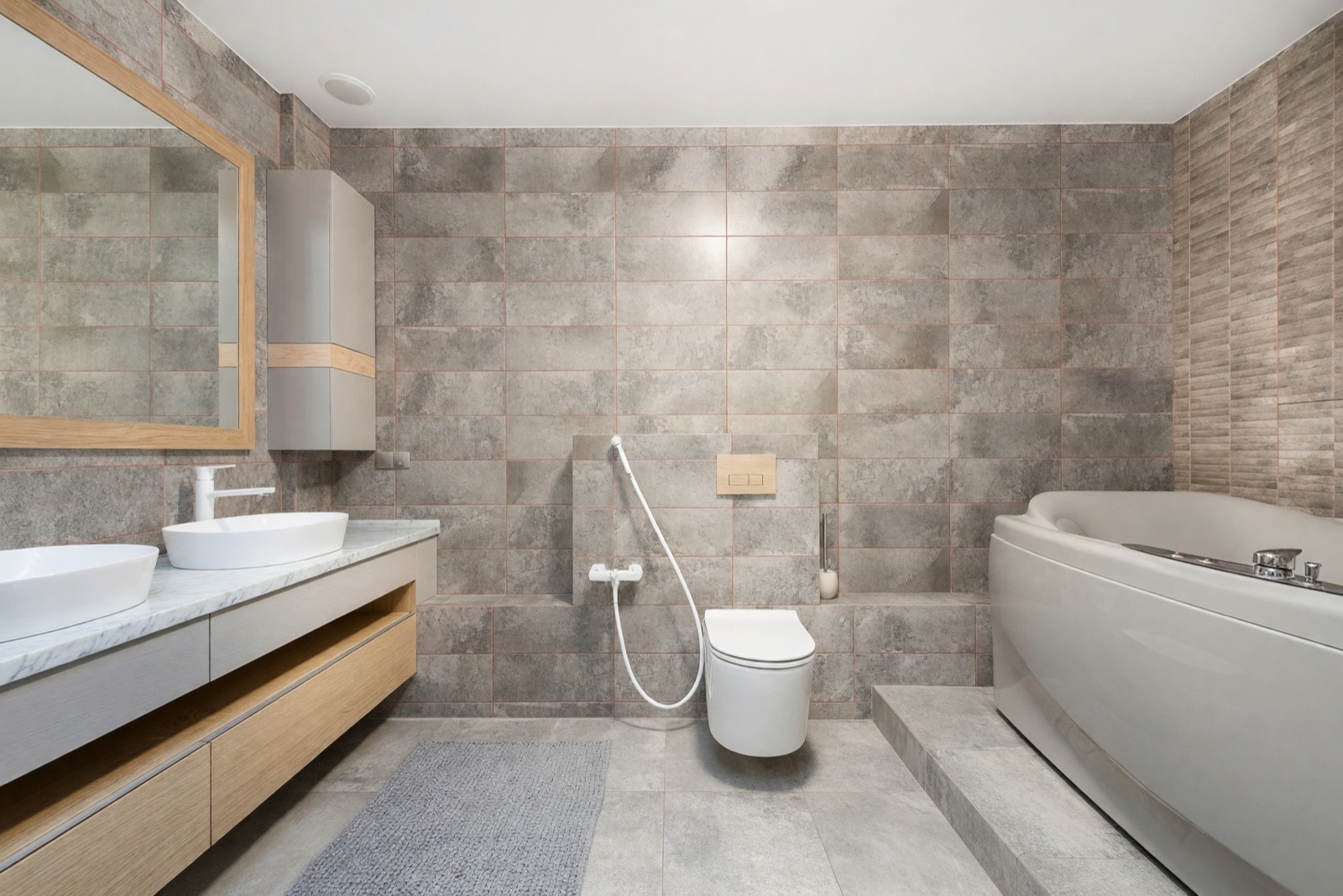
This is the default mode on a dated bathroom. The vanity, top, basins, faucet color and mirror frame all changed, while the toilet, step and wall tile did not move or change. The tub kept its shape and place but came out a softer off-white. The wall tile stayed, so a new tile would need its own test.
Step 3: read the result closely
Put the result next to your original photo and check these points slowly.
- Toilet, tub, shower and basin. Same place, same size? If one has moved, the picture is wrong, not the bathroom.
- Vanity doors and drawers. Count them against the original, then check the handles and the faucet.
- Metal finishes. Faucet, towel rail, hooks and door frame often change together. Look for the one that did not.
- Mirror and reflections. Reflections are redrawn and are often only roughly right, so judge the room from the room, not from the mirror.
- Tile and grout. Tile size and joint lines are approximate. Look at how they run into the corners.
- The extras. Look for objects that appeared, vanished or changed: a towel, a rug, a lid, a shelf.
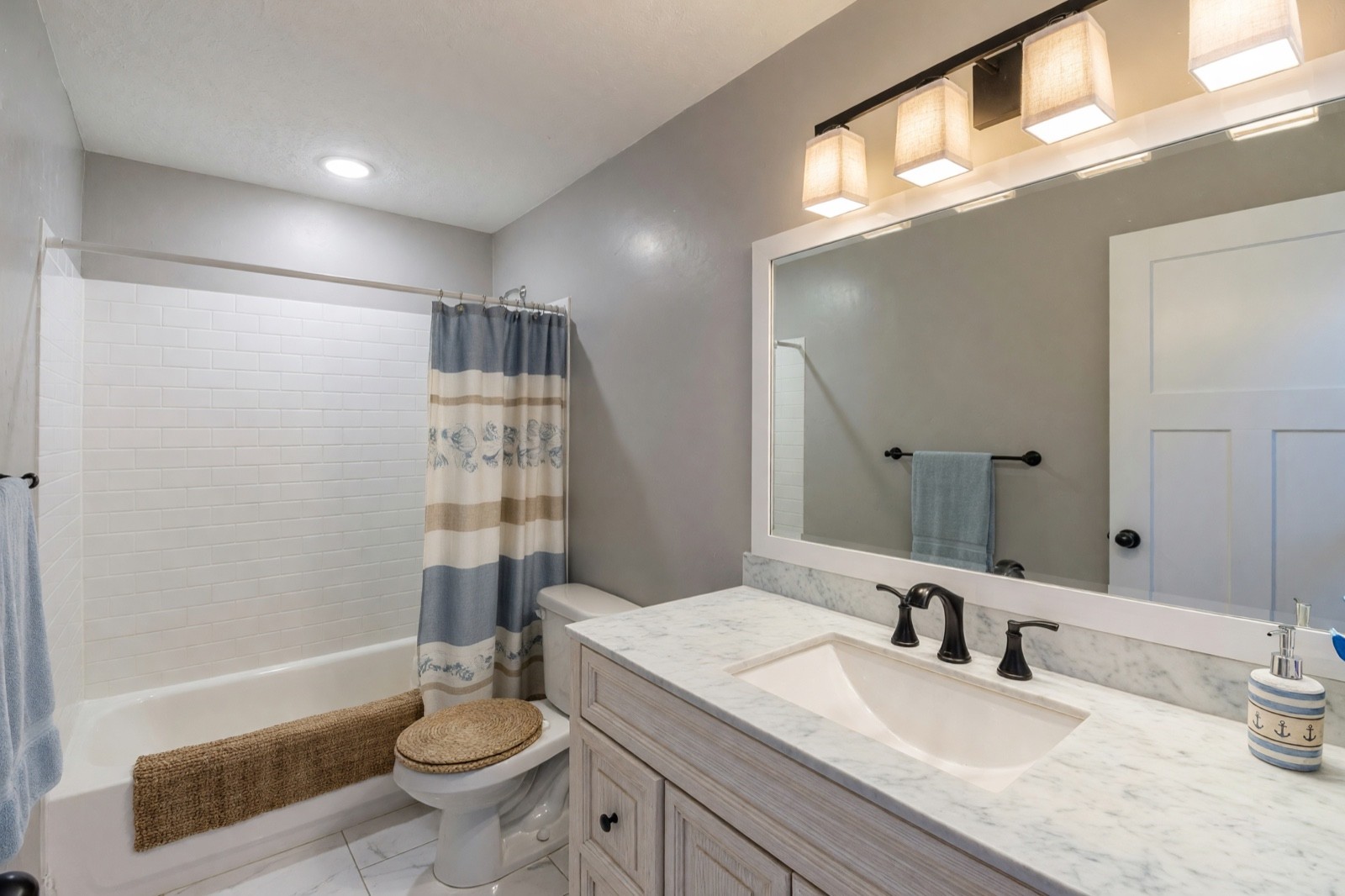
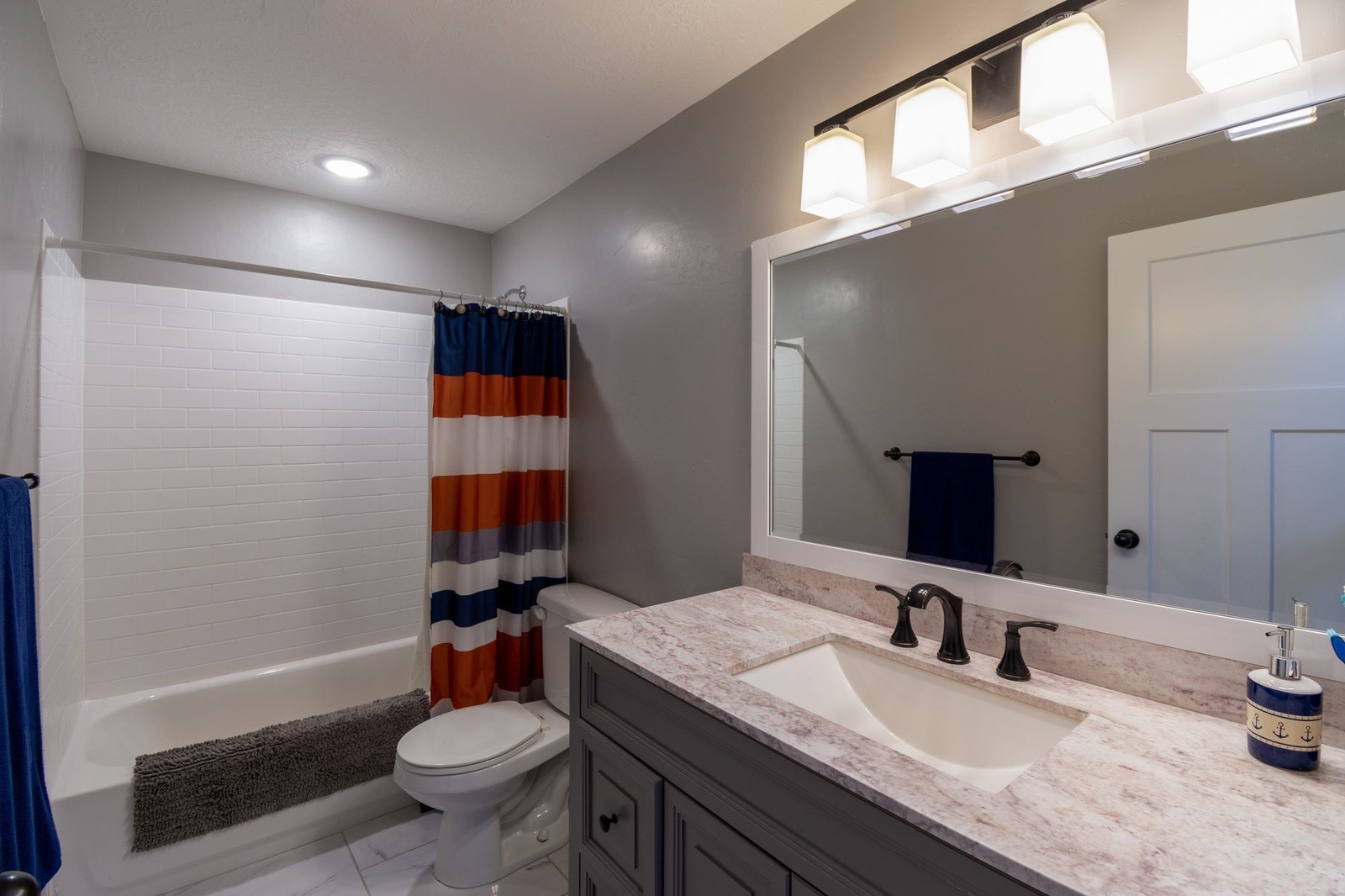
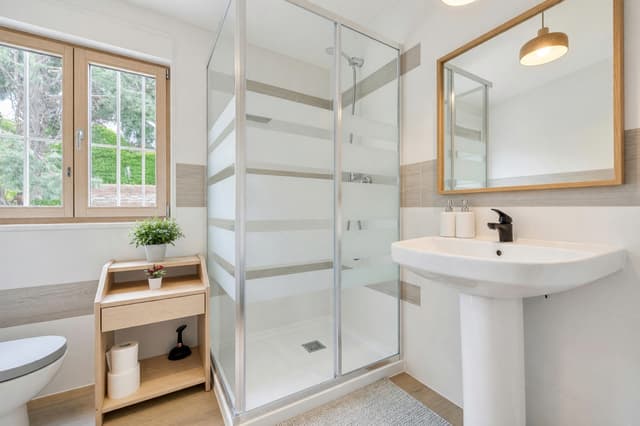
The soft goods, the vanity finish, the counter and the light shades all moved, while the walls and the tile did not. Nobody asked for the woven cover on the toilet seat. It is an invented object, and a good reminder to look for extras. The new shades also give the picture a warmer light than the original had, so judge the real light with a real bulb.
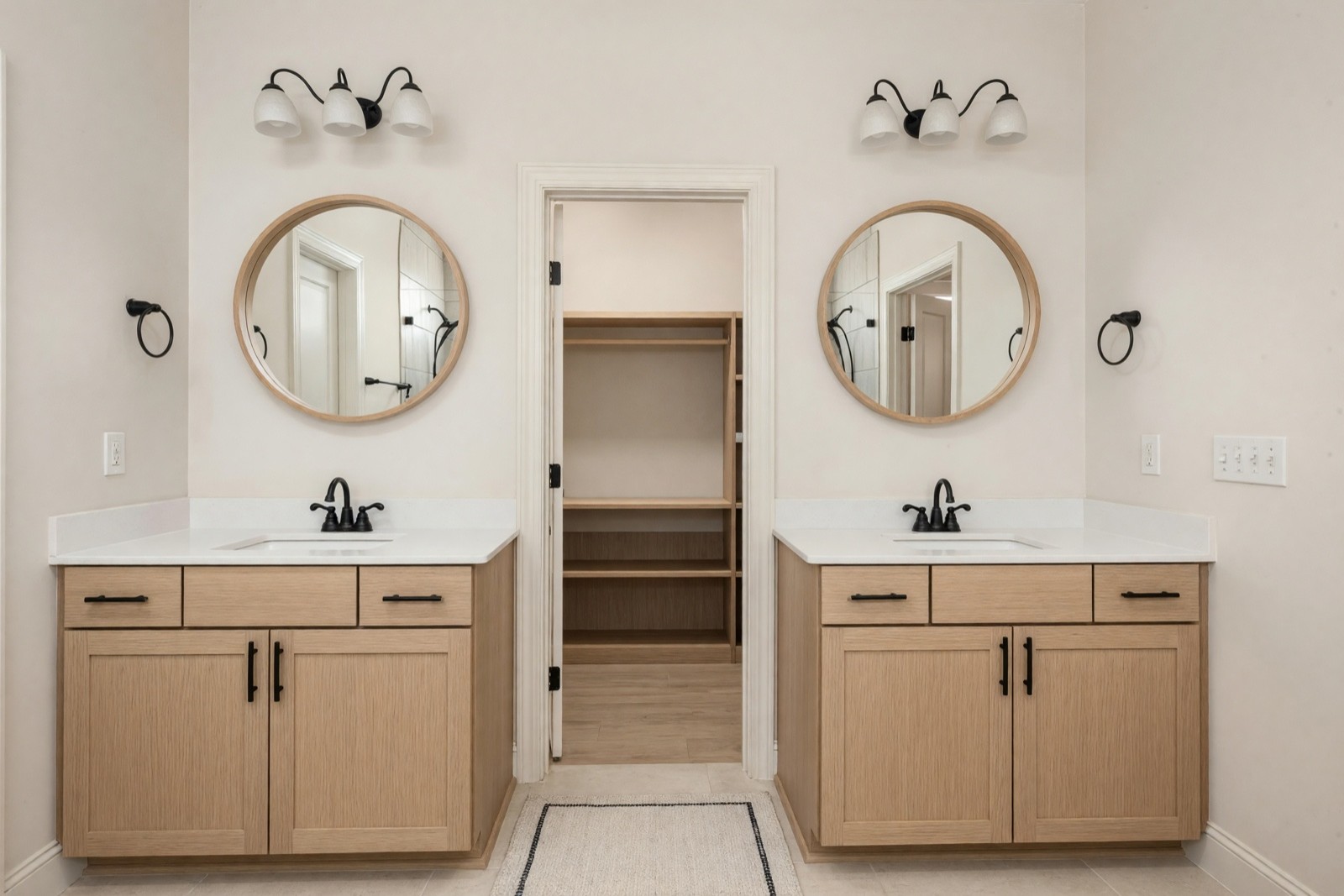
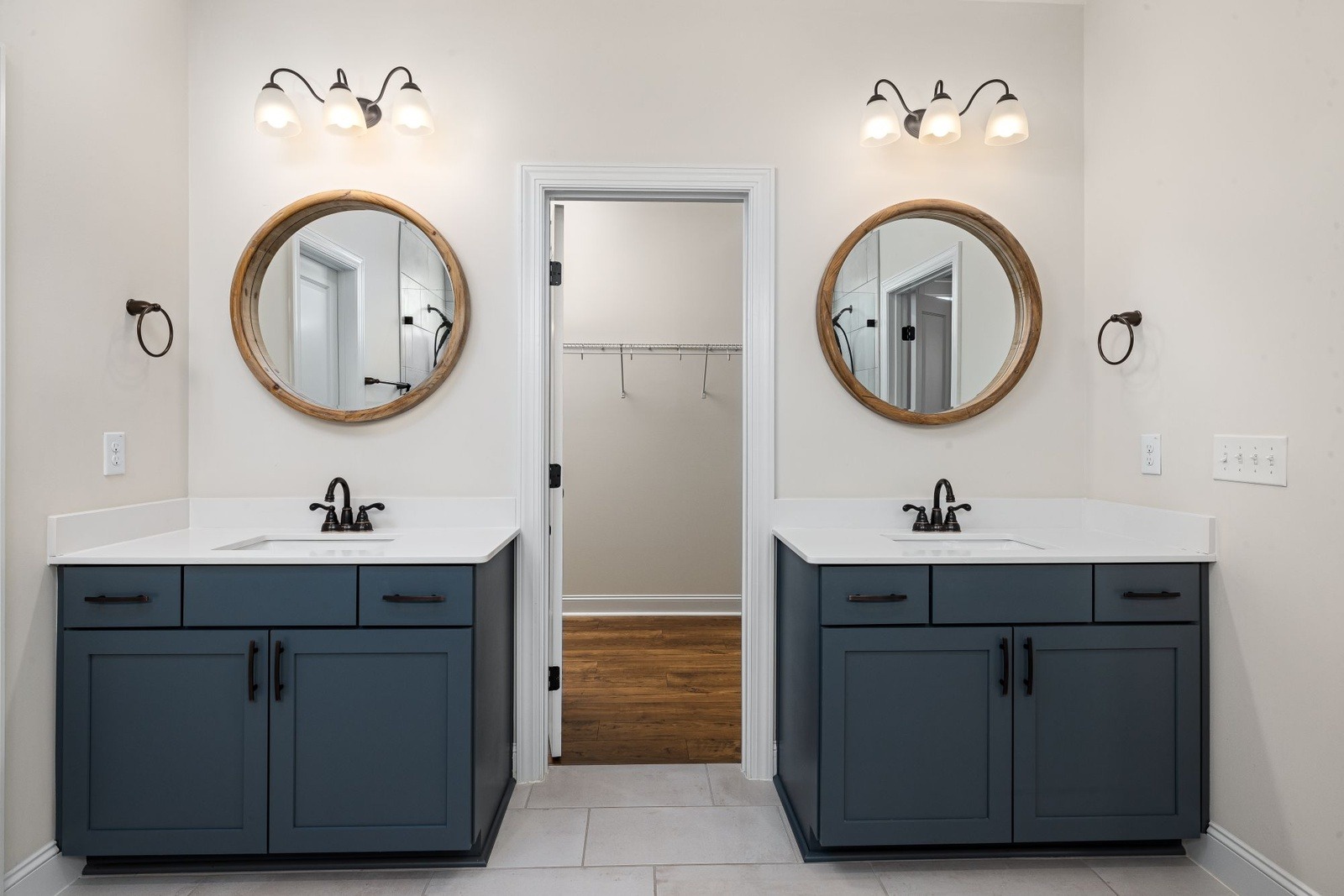
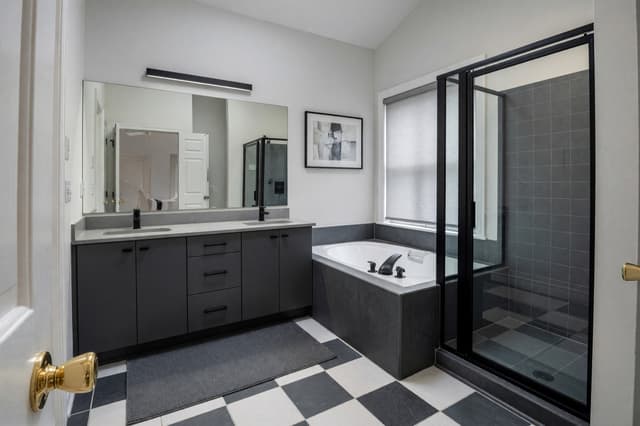
Color, hardware and mirror frames changed clearly, and the layout held. The light fixtures also came out switched off, so the room looks less warm. The AI also restyled the closet seen through the door, which was not the point of the photo. Anything that shows in the frame can be redrawn, including the next room.
Step 4: test one decision at a time
Change one setting between runs, so you can tell which choice did what. In a bathroom, a sensible order is the vanity and countertop first, because they set the mood, then the metal finish, then tile and floor, then the mirror and lights, and the towels and decor last. Run the same photo twice, change only the style or only the mode, and put the two results side by side.
To test a single surface, there are narrower tools. Color & Texture (Essential and Pro plans) changes the color or material of one object or surface that you select, such as the vanity. Floor Restyle changes only the floor. Paint repaints flat walls in a color you choose. Magic Edit (Pro plan) changes what you describe in a sentence.
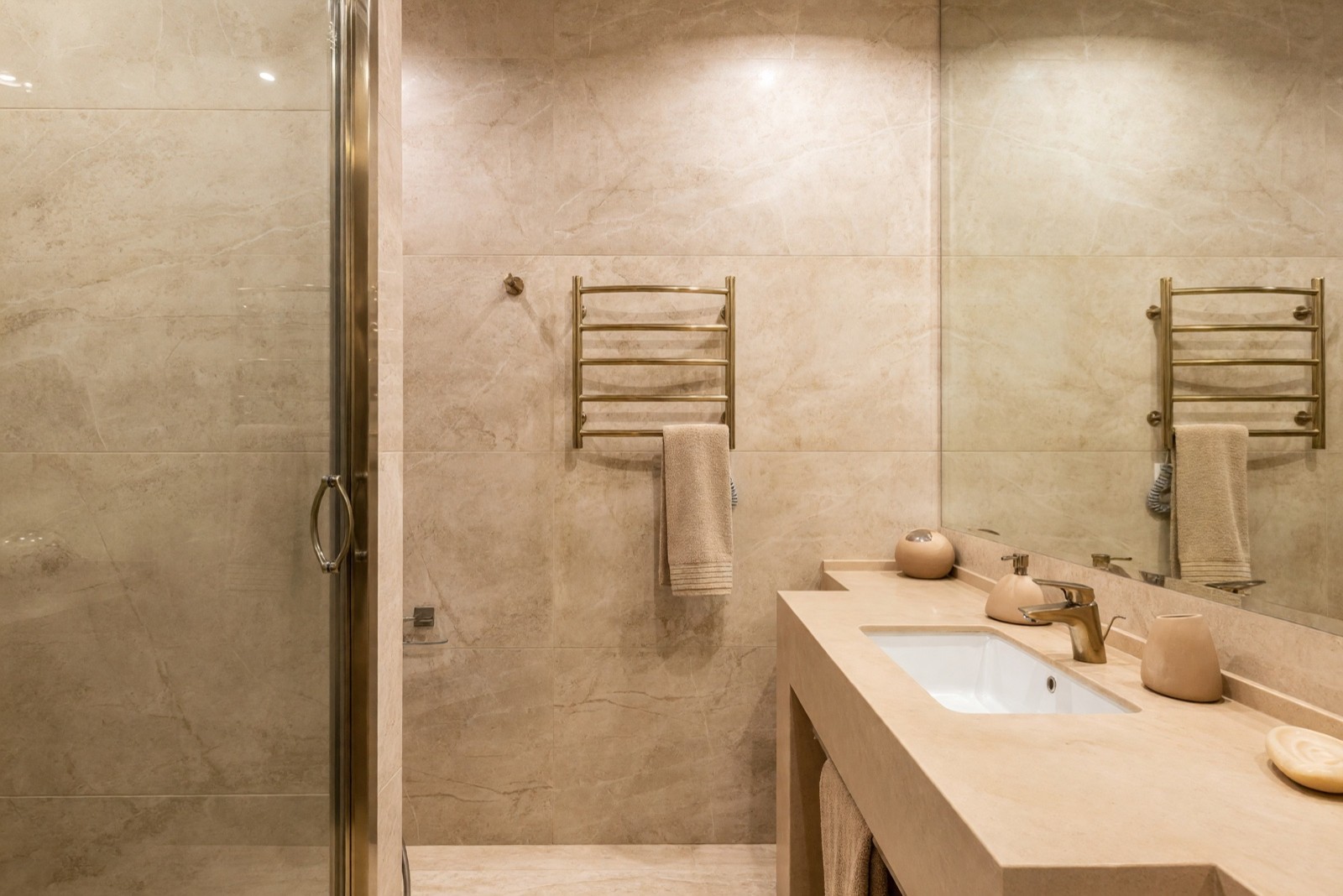
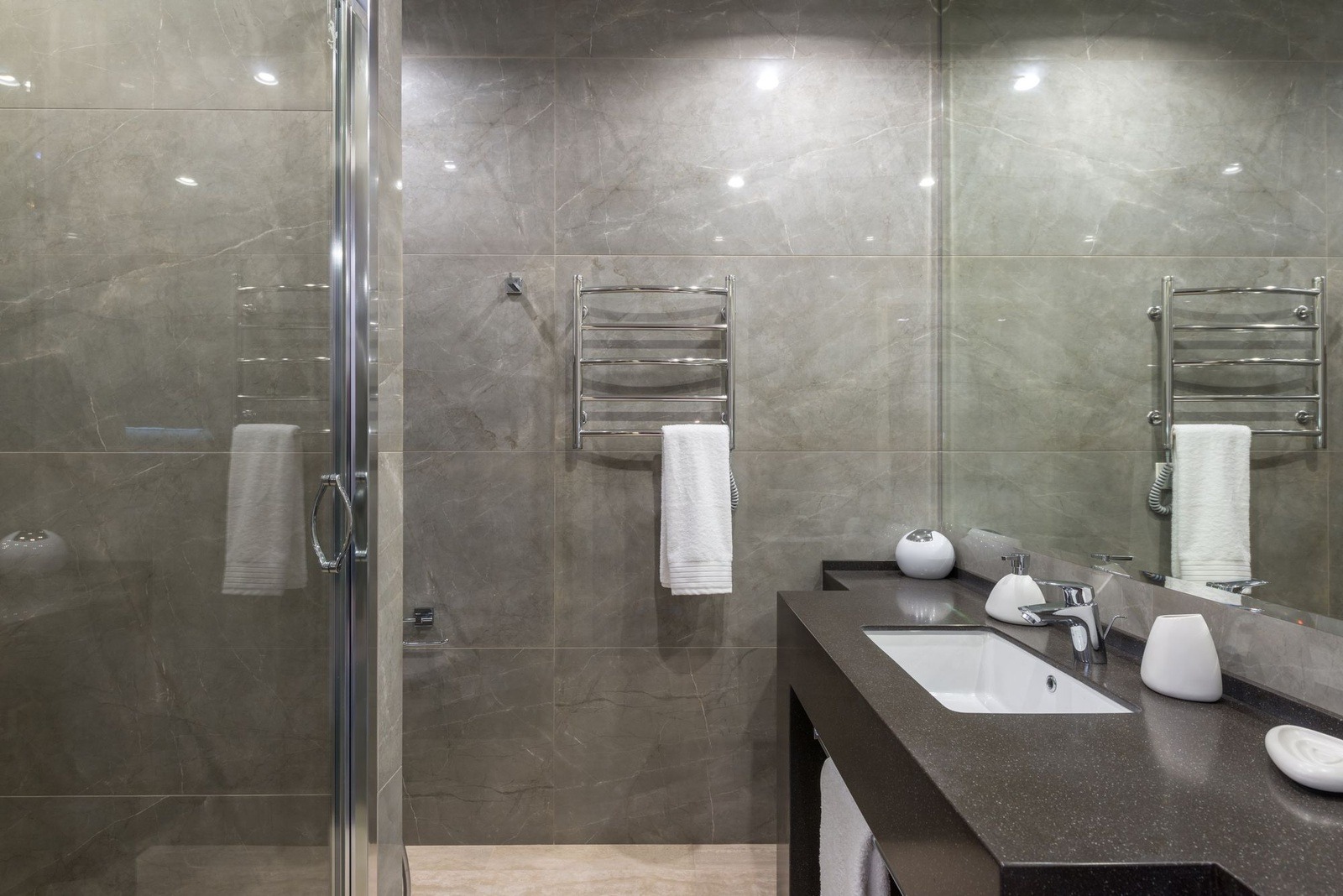
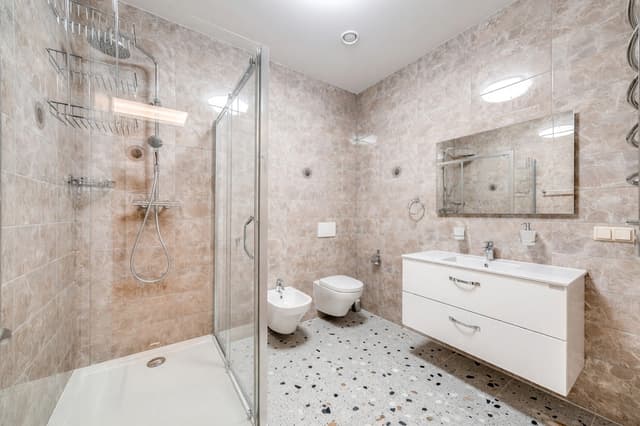
This is a full shift from cool gray to warm sand and brass, with the layout untouched. Here the wall tile changed color, while in the Scandinavian example it stayed. The same mode can leave tile alone or recolor it, so use the picture as a color direction and look at real tile samples.
Light Touch is the quickest test of small things. It adds accents and leaves every finish as it is.
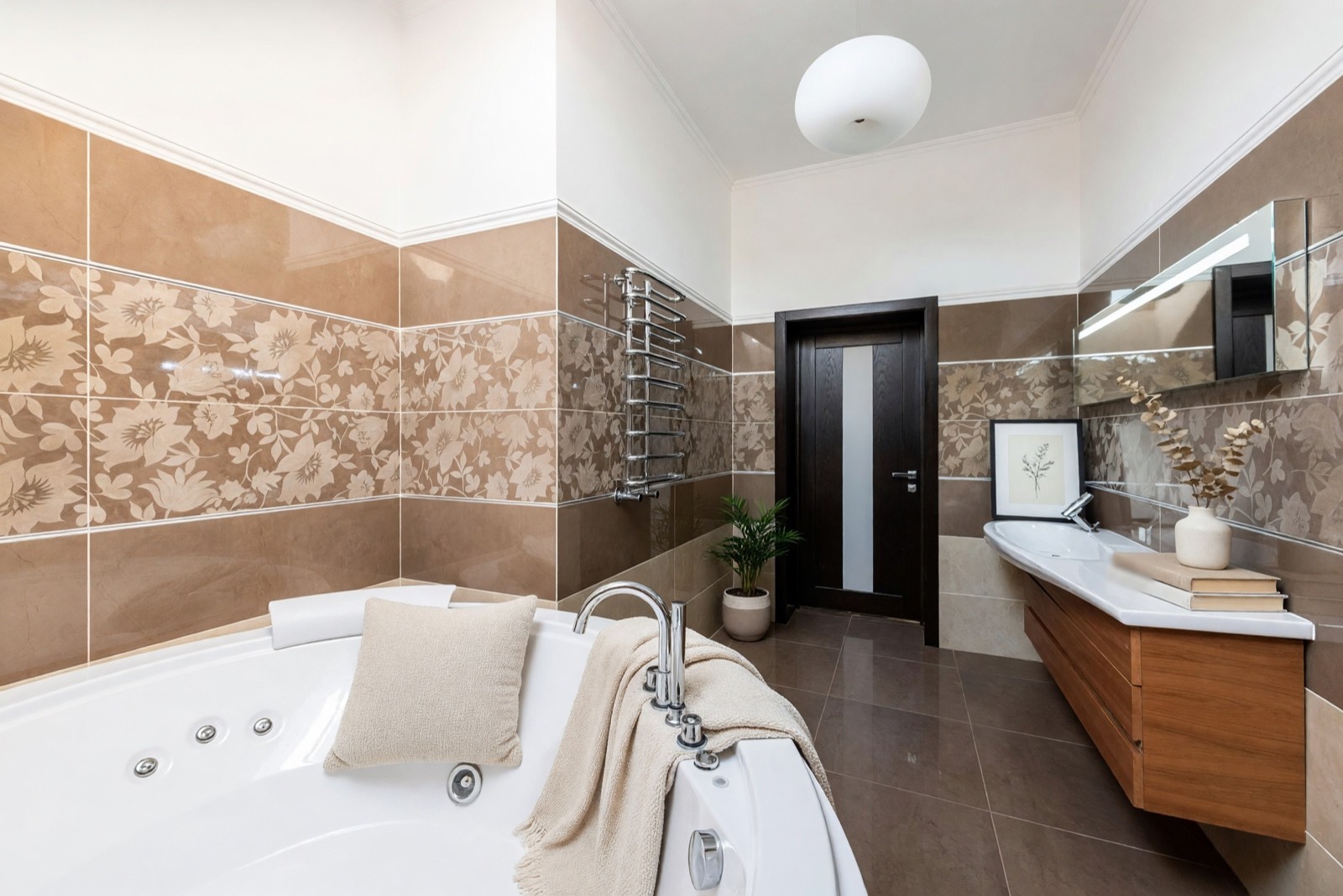
Nothing structural or finished changed, but see how the accents crowd the fixtures: the throw drapes over the base of the tub taps and the print crowds the basin faucet. A cushion in a tub is a styling idea, not a real setup. This is the second try; a busier first try was set aside, which is a normal part of testing.
What a bathroom picture cannot check
Wet areas and waterproofing
A picture shows how a tile looks, not what is behind it. Waterproofing, the shower base, the slope of the floor to the drain and the sealant are work for a licensed professional, and the rules differ from place to place.
Plumbing and layout
The toilet, tub, shower and basin stay where your photo has them. Moving one means new supply and drain lines and sometimes opening the floor. Ask a licensed plumber what is possible in your building before you plan around a new position.
Ventilation, lighting and electrical
A bathroom needs a way to clear moisture, and fixtures and sockets near water have safety rules that differ by country. A new vanity light in the picture says nothing about either, so ask a licensed electrician. For the look of the light, a bulb of about 2700 K reads cozy and about 4000 K reads crisper; the box says which one you are buying.
Real products and measurements
The AI invents the finishes you see, so a vanity or tile in the image does not exist in that exact color and profile. Measure the room, the basin, the door swing and the free floor in front of the toilet and the vanity, and check each real product's size before you buy.
Step 5: turn the picture into a plan with a professional
The picture shows a direction. A plan needs numbers, and those come from the room.
- Measure. Wall lengths, ceiling height, the window and door, and the free floor in front of each fixture.
- Look at real samples. Hold tile, a vanity door and a counter sample in your own bathroom, in daylight and in the evening, and ask how the floor tile is rated for wet areas and slip resistance.
- Ask the plumber and the electrician what can move, what must stay and what your building requires.
- Ask about waterproofing and ventilation before any tile goes up.
- Bring the picture as a mood reference, not as a drawing, and ask your contractor or designer for drawings.
Common mistakes
- Treating the picture as a plan. Interior Design keeps the layout; it does not improve it.
- Copying tile from the screen. Tile size, grout color and joints are approximate, so find the real tile.
- Changing everything at once. Vanity, metals, walls and lights together hide what caused the mood.
- Trusting small fixtures and reflections. Faucets, handles, mirrors and what shows in them can be redrawn wrong.
- Missing the extras. A cover, a rug or a shelf can appear or vanish without being asked.
- Picking colors on a screen. Displays and light shift colors, so hold a sample in the room.
Quick answers before you try AI bathroom design
Can ChatGPT help design my bathroom?
It can help you plan, but a picture it draws is not your bathroom. A chat assistant is good for writing a brief: who uses the bathroom, what must stay, which style words you like and what to ask a plumber. If it draws a bathroom, that is a new picture with other walls, fixtures and camera angle, so you cannot lay it over your room. The ChatGPT interior design guide compares the two ways of working. To see a look on your own walls and fixtures, start from a photo of your bathroom.
Is there a free AI bathroom remodel app?
Free tools usually limit something, such as the number of designs or the picture quality, or they add a watermark, so read the terms before you upload a photo. Interior Design is on every HomeCompose plan, including the free plan, which includes a limited number of designs, and free designs carry a watermark. It runs in your browser, so there is nothing to install. One free try on a straight-on photo already shows whether a look is worth pursuing.
Can AI design a bathroom with dimensions or from a floor plan?
Not from a photo. A photo restyle does not measure your room, and the sizes of what it draws are not guaranteed. A layout that fits real dimensions needs a plan, so measure the walls, the door swing and the free floor in front of each fixture first. If you already have a drawn floor plan, 3D Floor Plan (Pro plan) turns it into a furnished 3D picture of the home. The render has no dimensions, and fixtures such as a tub can change, so keep your plan next to it.
Can AI show a walk-in shower or a modern bathroom?
It can show the look, not the build. Choose the style Modern for simple lines, clean surfaces and neutral tones, and judge the shower finish as a style idea. Interior Design keeps the shower or tub your photo has, so it is not meant to swap one for a walk-in shower. Waterproofing, the shower base and plumbing are for licensed professionals.
Is a set budget enough for a bathroom remodel?
It depends on the size of the room, where you live, whether plumbing moves, how much tile work there is, the finishes and the labor. The cheapest changes usually leave the plumbing where it is: new hardware, a mirror, lighting, a repainted or refinished vanity; bathroom makeover ideas lists more. Get written local quotes from licensed professionals. The AI picture is a design idea, not a cost estimate, so use it to settle on a look and then ask for quotes on that look.
Honest limits of the picture
A result is a picture of an idea. The tool is built to keep the walls, windows and camera angle, but the AI can still redraw a fixture, a handle, a reflection or a shelf, and the bolder modes redo more surfaces. It can also make a small bathroom look brighter or roomier than it is. It is not a plumbing drawing, a waterproofing detail or a permit document.
Use it to agree on a direction with family or a contractor, then measure. The same method works for other rooms: see AI kitchen design from a photo for kitchens, and how to redesign a room from a photo with AI for any room. The HomeCompose guides page has more how-tos.
Frequently asked questions
Can AI redesign my bathroom from one photo?
Yes, as a visual idea. Interior Design restyles the vanity, countertop, faucets, mirror, lighting and decor in your photo, and the floor and wall finishes in some modes, and it keeps the walls, windows and camera angle. It is a picture to compare with your bathroom, not a plan, so check sizes and products before you buy.
Can AI move my toilet, tub or shower?
No. Interior Design keeps your layout, so the toilet, tub, shower and basin stay where your photo has them, and the AI may redraw them slightly. Moving them is a plumbing and waterproofing question for a licensed professional.
Which mode should I start with for a bathroom?
Start with Structural Preservation, the default. It refreshes the finishes and keeps the layout familiar. Move up to Bold Interior if the result stays too close to your bathroom, or down to Light Touch if you only want accents.
Can I change only the vanity or only the tile?
Interior Design restyles the whole look, so other things change too. To test one surface, use Color & Texture (Essential and Pro plans), use Floor Restyle for the floor, or describe the change in Magic Edit (Pro plan).
Is it free to try?
Yes. You can start on the free plan, and it includes a limited number of designs.